
WordPress 2.9 features a built-in Image Editor which provides basic image editing features. Now it’s not rocket science to use the Image Editor in WordPress 2.9 but somehow the image cropping feature didn’t work out for me initially. What happened was I didn’t know to use it properly. Apart from the other functions such as flipping images, scaling etc. the image crop in the editor works differently. Once you go through this tiny article you’ll discover how silly you and I have been not being able to use image cropping in the WordPress 2.9 editor.
Here’s how it’s done;

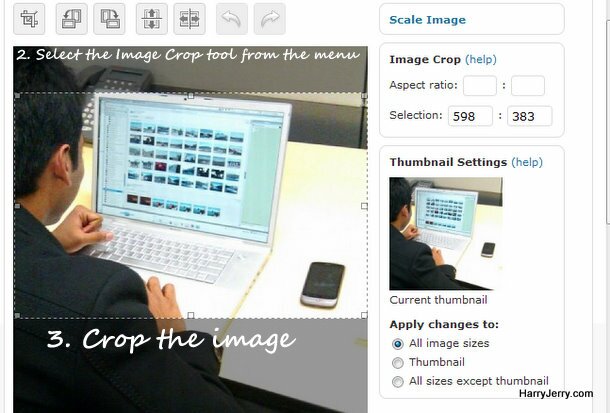
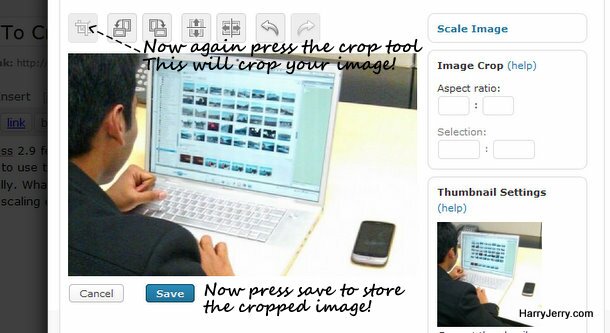
There you go, you weren’t supposed to click save and rather click on the crop tool again to crop the image. This is different from the way you work with other tools in the image editor in WordPress 2.9.
How lame?! 

Article by Harry
Harry has written 461 awesome articles on HarryJerry.com.
About: ...an engineering student, a freelancer, a professional blogger, a loving lover, too shy, an Internet freak....and everything I shouldn't be.
|
|
Tags: blogging, features, how-to, image cropping, image editor, troubleshoot, wordpress 2.9
Related Posts
- WordPress 2.9 – All you need to know to upgrade
- WordPress Mobile App for Nokia Phones
- Add Share With Orkut Button To Your WordPress Blog
- Attending WordCamp India in Delhi
- Photos: iPhone 3G goes butt naked!
- Comic – Save The Tiger?
- Move over Super Heros, here comes Hancock!
- 5 ways to speed up Mozilla Firefox!